
Columnar VS Row Storage In Databases
Columnar storage is optimal for analytical queries, while row storage is optimal for transactional queries. This article explores the difference.
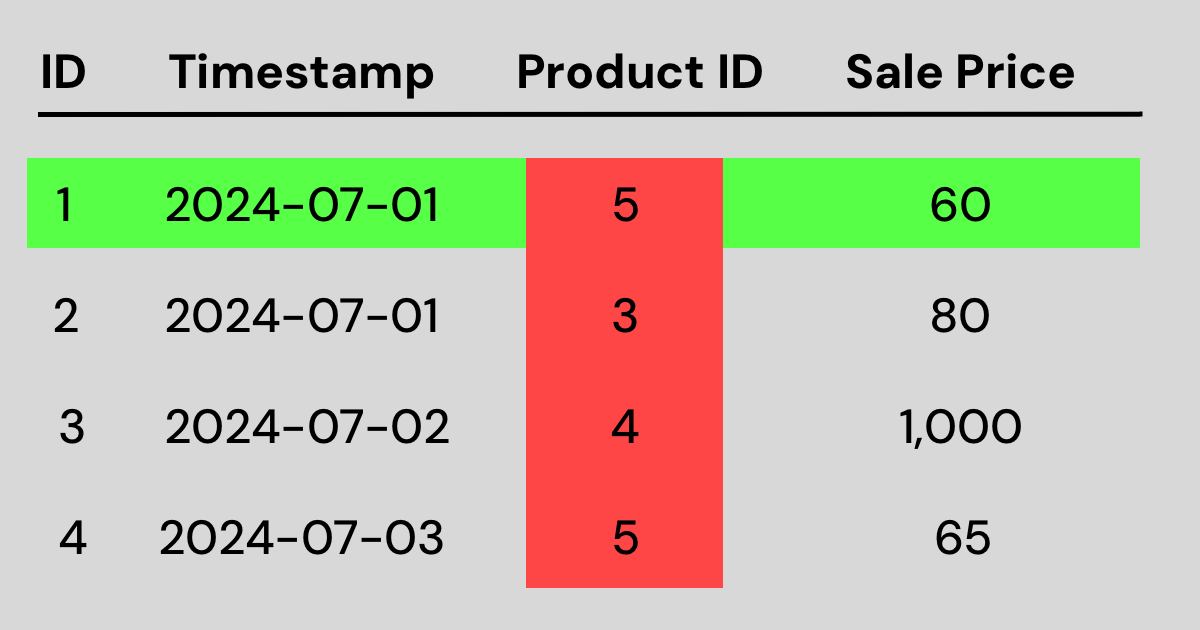 Row VS column storage visualizationFull-size image ↗
Whenever you hear a table or database called "row oriented", "columnar", or basically any terminology suggesting that it is written via rows or columns, they are specifying the way that the database stores data.
If you think about a spinning hard drive, or even an array holding an SSD's memory addresses, both are ultimately one dimensional. At some point, all of our data has to be laid out in a linear order. If we write it in a row-oriented fashion, we write one entire row at a time before moving on to the next row. If we write it in a column-oriented fashion, we write one entire column before moving on to the next column.
This distinction matters because databases are often optimized around their most common access pattern. Some workloads mostly read and write complete records, while others mostly scan large amounts of data to calculate aggregates like totals, averages, or counts. The way data is laid out on disk can make one of those workloads much faster than the other.
Row-oriented storage
Let's write the data in the image from the top of the article in a row-wise fashion. We simply write the data one row at a time:
1, 2024-07-01, 5, 60, 2, 2024-07-01, 3, 80, 3, 2024-07-02, 4, 1000, 4, 2024-07-03, 5, 65
This type of storage is ideal for transactional data, such as recording a purchase. Each row represents a purchase, so whenever one is made, we can append the purchase's data to the end.
It is also a natural fit for queries that need a complete record. If a user opens an order page and your application needs the order ID, timestamp, product ID, and total amount, row storage places those values right next to each other. That means fewer reads are needed to reconstruct the full row.
However, what if you wanted to answer a question like "what is our top-selling product ID?" The computer would have to read pieces of data from the storage medium that are far apart. Even though you only care about the product ID column, the surrounding values for each row are still mixed in with it. This is where columnar storage helps.
Column-oriented storage
Now let's try writing that same data in a columnar fashion:
1, 2, 3, 4, 2024-07-01, 2024-07-01, 2024-07-02, 2024-07-03, 5, 3, 4, 5, 60, 80, 1000, 65
This type of storage is ideal for answering a question like "what is our top-selling product ID?"
As you can see, the product IDs are all stored together: 5, 3, 4, 5. This means the computer does not have to search as far or load as much data into main memory to answer the query.
This is why columnar storage is so effective for analytics. If you want to compute the average sale amount, count purchases by date, or find the most common product ID, the database can often read only the columns involved in the query instead of reading every field in every row.
Columnar storage also tends to compress well. When similar values are stored together, such as many dates in a row or many numeric totals in a row, compression algorithms can reduce the amount of space required and the amount of data that has to be read from disk.
However, what if you wanted to record a single purchase in this table? You would have to insert data into this structure in four different places. You would have to append the ID directly after the other IDs, the timestamp directly after the other timestamps, and so on. Because of this, columnar databases are not well suited for recording small amounts of transactional data quickly.
In practice, this is the core tradeoff. Row storage is excellent when you frequently insert, update, or fetch complete records one at a time. Columnar storage is excellent when you scan lots of records but only need a few columns from each one.
Z-oriented storage
Z-oriented storage is a little different from row-oriented and column-oriented storage. Rather than being purely about whether data is laid out by row or by column, it is about ordering data so that values that are close together across multiple dimensions are also stored close together on disk.
The name usually comes from the Z-order curve, which is a way of mapping multidimensional data into a single sequence while trying to preserve locality. For example, imagine a table with columns like country, event_date, and customer_id. If queries often filter on combinations of those fields, a Z-order style layout can place related records nearer to each other physically, making those filters more efficient.
This can be useful in analytical systems where queries do not just scan one column, but repeatedly narrow down data using several columns at once. Instead of helping mainly with "read one whole row" or "scan one whole column," Z-oriented storage helps reduce how much data must be scanned when multiple predicates are involved.
It is best thought of as a locality optimization layered on top of a storage engine, rather than as a complete replacement for row or column storage. In practice, most modern analytical systems still use columnar storage. However, Z storage algorithms can in theory improve the performance of many queries.
Conclusion
Row-oriented and column-oriented data storage systems complement each other. Frequently, organizations use row-oriented systems, such as a transactional relational database, to record critical information about their operations. Then, later on, they move that data to a column-oriented system, such as a data warehouse, to perform analytics and gain insight into their operations.
Put another way, row storage is usually associated with operational workloads, while columnar storage is usually associated with analytical workloads. The best choice depends on whether your database is primarily helping your application handle transactions or helping your team answer analytical questions.